Wrapping up data collection
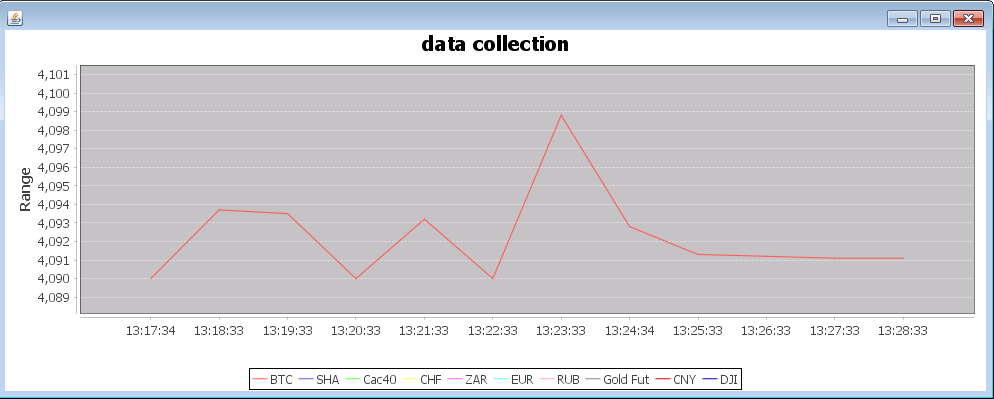
Image: Helmut Hauschild, HSEC
First published at Notes on Personal Data Science on 6 March 2016.

To finally start with the data collection, you need some framework for your Quote Readers. So this is, what we are going to build next.
We use three external libraries to facilitate this task:
- Google Gueva V. 19.0 (Apache license 2.0)
- Cron4J 2.2 by Sauron Software (LGPL license)
- JFreeChart 1.0.19 by Object Refinery (LGPL license).
Cron4J provides a lightweight scheduler, which we use to repeatedly execute the following process in a controlled manner:
- Load data from online resources using a bunch of QuoteReaders.
- Write the data to a new line in an output file.
- Visualize the data in a line chart.
From the Gueva library we use the EventBus to decouple the main process from the data output to keep technical problems contained. Please note, that the EventBus is marked @Beta in Gueva.
JFreeChart gives us an easy way to output the data as a chart, which is sometimes helpful.
Main
Let’s examine the main method.
/**
* Main method
*
* @param args Optional: 1. chart|nochart, 2. output filename.
*/
public static void main(String[] args) {
// add a shutdown hook for finishing the output file when the process is
// stopped
addShutdownHook();
// Quote Reader for Bitstamp data
final QuoteReader rdr = new BitstampQuoteReader();
// etf tracking the csi300
final QuoteReader yqrSha = new YahooFinanceQuoteReader(
“ASHR”);
final QuoteReader yqrCac40 = new YahooFinanceQuoteReader(
“%5EFCHI”);
final QuoteReader yqrChf = new YahooFinanceQuoteReader(
“CHFUSD%3DX”);
final QuoteReader yqrZar = new YahooFinanceQuoteReader(
“ZARUSD%3DX”);
final QuoteReader rqrEur = new YahooFinanceQuoteReader(
“EURUSD%3DX”);
final QuoteReader yqrRub = new YahooFinanceQuoteReader(
“RUBUSD%3DX”);
final QuoteReader yqrCny = new YahooFinanceQuoteReader(
“CNY%3DX”);
final QuoteReader yqrGoldFutures = new YahooFinanceQuoteReader(
“GCJ16.CMX”);
// SPDR Dow Jones Industrial Average ETF (DIA) reflects the Dow Jones
// Index.
// we need to use this, because Yahoo no longer provides the original
// index
// as CSV
final QuoteReader yqrDowJones = new YahooFinanceQuoteReader(
“DIA”);
// create event bus
final EventBus eventBus = new EventBus(“hsecDataCollectorEventBus”);
// register file writer
eventBus.register(new OutputFileWriter(getOutputFileName(args)));
// if paramter “chart” is set, register ChartWriter
if (checkChartArgument(args))
eventBus.register(new ChartWriter());
// ——————-
// here would be the place to register more event handlers
// like a database writer, RSS publisher …
// ——————-
final IntHolder failedConsecutiveLoops = new IntHolder();
// a random offset time for scheduled events for desynchronization of
// running instances:
// prevents that all instances of this program access the APIs at the
// first second of each minute.
final long offsetTime = Math.round(Math.random() * 59000d);
Runnable dataCollectorSchedulerTask = new Runnable() {
public void run() {
//lets look at this later…
};
// Scheduler for data collection
Scheduler dataCollectorScheduler = new Scheduler();
dataCollectorScheduler.schedule(SCHEDULE_EVERY_MINUTE,
dataCollectorSchedulerTask);
dataCollectorScheduler.start();
// keep running as long as everything is ok.
while (keepRunning && failedConsecutiveLoops.i > 100) {
try {
Thread.sleep(60000);
} catch (InterruptedException e) {
//ignore
}
}
dataCollectorScheduler.stop();
}
\
Starting in line 16, we initialize the following quote readers:
| Symbol | Comment |
| BTC | Bitcoin in USD, Quote from Bitstamp. |
| ASHR | An ETF tracking the CSI500, giving us information about the health of Chinese markets. |
| ^FCHI | CAC 40 Quote from Yahoo |
| CHFUSD.X | CHF in USD, Quote from Yahoo |
| ZARUSD.X | ZAR in USD, Quote from Yahoo |
| EURUSD.X | EUR in USD, Quote from Yahoo |
| RUBUSD.X | RUB in USD, Quote from Yahoo |
| CNY.X | CNY in USD, Quote from Yahoo |
| GCJ16.CMX | Gold Futures, Quote from Yahoo |
| DIA | An ETF tracking the Dow Jones Industrial Index. |
Some indices are not provided by Yahoo when using the API, but for our purpose, an ETF tracking the index works just as well.
Starting in line 40, we initialize the EventBus and register the data sinks.
In line 68ff, we prepare and start the Scheduler to execute the main loop once a minute.
Next we take a closer look on the Runnable:
public void run() {
if (failedConsecutiveLoops.i > 5) {
// something’s stinky. Sleep some extra time to give remote
// systems time to recover.
if (failedConsecutiveLoops.i % 7 != 0) {
failedConsecutiveLoops.i++;
return;
}
}
// sleep offset time
try {
Thread.sleep(offsetTime);
} catch (InterruptedException e1) {
// ignore
}
// read and publish quotes
QuotesChangedEvent e = new QuotesChangedEvent();
e.currentBtcQuote = rdr.getCurrentQuote();
e.quoteSha = yqrSha.getCurrentQuote();
e.quoteCac40 = yqrCac40.getCurrentQuote();
e.quoteChf = yqrChf.getCurrentQuote();
e.quoteZar = yqrZar.getCurrentQuote();
e.quoteEur = rqrEur.getCurrentQuote();
e.quoteRub = yqrRub.getCurrentQuote();
e.quoteGoldFuture = yqrGoldFutures.getCurrentQuote();
e.quoteCny = yqrCny.getCurrentQuote();
e.quoteDJI = yqrDowJones.getCurrentQuote();
e.bidBtc = rdr.getBid();
e.askBtc = rdr.getAsk();
e.min24Btc = rdr.getMin24();
e.max24Btc = rdr.getMax24();
e.volume24Btc = rdr.getVolume24();
e.vwapBtc = rdr.getVwap();
// Post event
eventBus.post(e);
// reset failed loop counter
failedConsecutiveLoops.i = 0;
}\
The counter “failedConsecutiveLoop” contains the number of runs that have failed so far in a row. Normally it should be 0. From time to time it will be a small number. When it reaches a big number, we assume that something is broken and will not recover in the forseable future. In this case we stop the scheduler and end the program.
QuotesChangedEvent
This class is just a plain data container. For the sake of readability we don’t use getters and setters.
/**
* Event to be fired when new quotes have been loaded.
*/
static final class QuotesChangedEvent {
double currentBtcQuote;
double quoteSha;
double quoteCac40;
double quoteChf;
double quoteZar;
double quoteEur;
double quoteRub;
double quoteGoldFuture;
double quoteCny;
double quoteDJI;
double bidBtc;
double askBtc;
double min24Btc;
double max24Btc;
double volume24Btc;
double vwapBtc;
}\
Data Sinks
The data sinks are ChartWriter and FileOutputWriter. There is not much to explain. You could use them as a template for other data sinks. The one that probably makes most sense is a relational database.
/**
* Writes a set of quotes to a line chart.
*/
static final class ChartWriter {
/**
* dataset object for chart
*/
DefaultCategoryDataset dataset = new DefaultCategoryDataset();
/**
* initialize the chart.
*
* @return JFreeChart object to feed.
*/
private JFreeChart createLineChart() {
JFreeChart createLineChart = ChartFactory.createLineChart(
“data collection”, “", “Range”, dataset);
JFreeChart lineChart = createLineChart;
lineChart.setAntiAlias(true);
return createLineChart;
}
public ChartWriter() {
try {
JFrame frame = new JFrame();
ChartPanel cp = new ChartPanel(createLineChart());
frame.getContentPane().add(cp);
frame.setSize(1200, 700);
frame.show();
} catch (Exception e) {
log.severe(e.getLocalizedMessage());
}
}
@Subscribe
public void recordQuoteChange(QuotesChangedEvent e) {
String lTimeFormatted = DateFormat.getTimeInstance().format(
new Date());
// some normalization for the charts, so all values are in the same
// ballpark
dataset.addValue(e.currentBtcQuote / 100, “BTC”, lTimeFormatted);
dataset.addValue(e.quoteSha / 30, “SHA”, lTimeFormatted);
dataset.addValue(e.quoteCac40 / 5000, “Cac40”, lTimeFormatted);
dataset.addValue(e.quoteChf, “CHF”, lTimeFormatted);
dataset.addValue(e.quoteZar * 10, “ZAR”, lTimeFormatted);
dataset.addValue(e.quoteEur, “EUR”, lTimeFormatted);
dataset.addValue(e.quoteRub * 10, “RUB”, lTimeFormatted);
dataset.addValue(e.quoteGoldFuture / 20000, “Gold Fut”,
lTimeFormatted);
dataset.addValue(e.quoteCny / 10, “CNY”, lTimeFormatted);
dataset.addValue(e.quoteDJI / 1000, “DJI”, lTimeFormatted);
if (dataset.getColumnCount() > 1000) {
dataset.removeColumn(0);
}
}
}
/**
* Writes a set of quotes to a new line in the output file.
*/
static final class OutputFileWriter {
/**
* writer for collected data
*/
private FileWriter w;
/**
* Constructor
* @param outputFileName not null
*/
public OutputFileWriter(String outputFileName) {
try {
w = new FileWriter(outputFileName);
w.append("currentQuoteBtc"
+ "\tquoteSha\tquoteCac40\tquoteChf\tquoteZar\tquoteEur\tquoteRub\tquoteGold"
+ "\tquoteCny\tquoteDji"
+ "\tbid\task\tmin24\tmax24\tvolume24\tvwap");
w.append("\n");
w.flush();
} catch (Exception e) {
log.severe(e.getLocalizedMessage());
}
}
@Subscribe
public void recordQuoteChange(QuotesChangedEvent e) {
try {
w.append(String.format(”%.3f\t%.3f\t%.3f\t%.3f\t%.3f"
+ “\t%.3f\t%.3f\t%.3f\t%.3f\t%.3f”, e.currentBtcQuote,
e.quoteSha, e.quoteCac40, e.quoteChf, e.quoteZar,
e.quoteEur, e.quoteRub, e.quoteGoldFuture, e.quoteCny,
e.quoteDJI));
w.append(String.format("\t%.3f\t%.3f\t%.3f\t%.3f\t%.3f\t%.3f",
e.bidBtc, e.askBtc, e.min24Btc, e.max24Btc,
e.volume24Btc, e.vwapBtc));
w.append("\n");
w.flush();
} catch (IOException ioe) {
log.warning(“failed to write out data”);
}
}
}
\
A few auxiliary methods:
/**
* check if chart parameter has been set
*/
private static boolean checkChartArgument(String[] args) {
return args != null && args.length > 0
&& “chart”.equalsIgnoreCase(args[0]);
}
/**
* read the output filename from arguments
*/
private static String getOutputFileName(String[] args) {
return (args != null && args.length > 1) ? args[1] : “output.csv”;
}
/**
* clean up when the VM is about to be terminated
*/
private static void addShutdownHook() {
final Thread mainThread = Thread.currentThread();
Runtime.getRuntime().addShutdownHook(new Thread() {
public void run() {
log.warning(“VM is being shut down now.”);
// stop schedulers
keepRunning = false;
try {
mainThread.join();
} catch (InterruptedException e) {
log.log(Level.SEVERE, “", e);
}
}
});
}\
And for the sake of completeness: here are the statics:
/**
* Data Collector schedule 1/minute (cron string)
*/
private static final String SCHEDULE_EVERY_MINUTE = “* * * * *”;
/**
* Logger
*/
static Logger log = Logger.getLogger(DataCollector.class.getName());
/**
* Data collection proceeds, while the value is true.
*/
static volatile boolean keepRunning = true;\
To run the programm from the console, type
java de.hsec.datascience.btctrader.DataCollector chart myCollectedData.csv
\
If you (like me) run the data collection on a remote machine without GUI, then you want to use “nochart” instead of “chart” as first parameter.
Congratulations
You have reached the first important milestone. There is still a lot of work ahead:
- Building the Prediction Neural Network
- Training the Neural Network
- Testing the Neural Network
- Creating a Bitstamp acount and deposit funds
- Building a trading bot that uses the predictions of your Neural Network for automated transactions on the Bitstamp exchange.
That is quite some ground to cover and it will take us a while to get there, but while you go the next steps, you can already collect that data, that you need later for training and testing.