SAP Integration Excellence in Automotive Engineering
The Challenge: Bridging Engineering and Business Systems
Automotive companies run on two fundamentally different technology ecosystems:
Engineering Systems (where products are designed):
- Product Data Management (PDM/PLM): Siemens Teamcenter, PTC Windchill, Dassault ENOVIA
- Computer-Aided Design (CAD): CATIA, NX, Creo, SolidWorks
- Computer-Aided Engineering (CAE): simulation, analysis, testing tools
- Manufacturing planning systems
Business Systems (where products are sold and serviced):
- SAP ERP: Finance, procurement, materials management, sales
- SAP CRM: Customer relationships, dealer networks
- SAP SCM: Supply chain planning and execution
- SAP PLM (distinct from engineering PLM tools)
These systems need to exchange critical data:
- Part numbers and BOMs (engineering → procurement → manufacturing)
- Engineering changes (ECO/ECN workflows spanning both worlds)
- Procurement data (supplier info, costs, lead times)
- Manufacturing work orders (BOM → production planning → shop floor)
- Quality data (defects, warranties flowing between systems)
The Problem: SAP and engineering tools speak different languages, use different data models, and have different integration capabilities.
Our Solution: For nearly two decades, we’ve been building robust integration bridges using a spectrum of SAP integration technologies—adapting our approach as both SAP and engineering systems have evolved.
The Technology Evolution: SAP Integration Since 2007
Phase 1 (2007-2010): Enterprise Application Integration (EAI)
Context: Early SAP R/3 systems with limited native integration capabilities. Engineering data lived in custom databases and file systems.
Technology Stack:
- SAP XI/PI (Exchange Infrastructure / Process Integration): Middleware for orchestrating complex integration scenarios
- IDocs (Intermediate Documents): SAP’s proprietary data exchange format
- RFC (Remote Function Call): Synchronous calls between systems
- Custom adapters: Connecting non-SAP engineering systems to SAP XI/PI
Use Case Example: Automotive OEM Engineering Change Management
Flow:
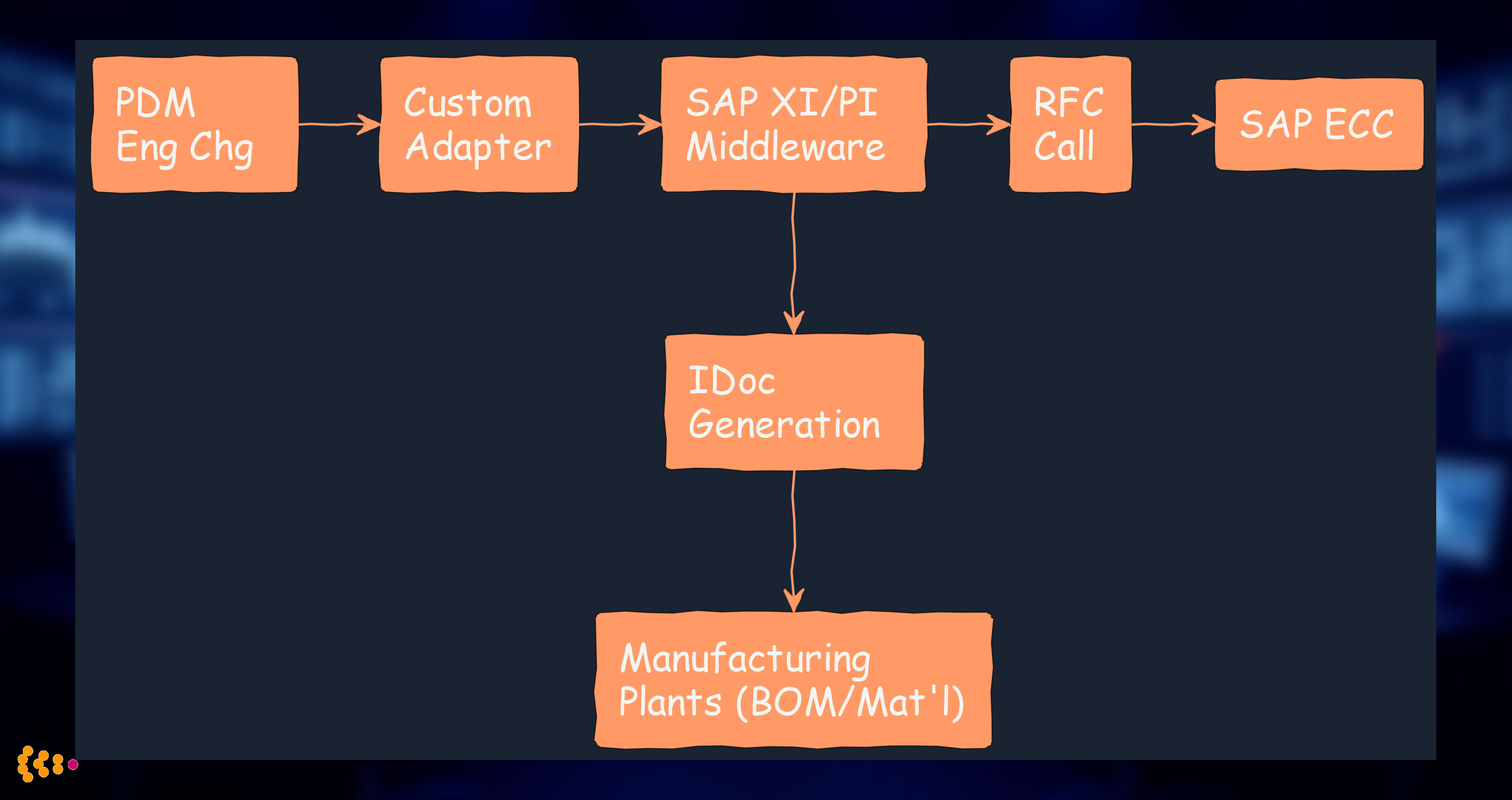
Challenges:
- Complexity: XI/PI required extensive ABAP development and mapping configuration
- Performance: Synchronous RFC calls created bottlenecks for large BOMs
- Error handling: Tracing failures across XI/PI → RFC → IDoc layers was difficult
Lessons: EAI is powerful for orchestration but heavyweight. Reserve for complex scenarios; simpler patterns benefit from lighter-weight approaches.
Phase 2 (2010-2015): JCo (Java Connector) and Direct RFC
Context: Need for faster, more direct integration from Java-based engineering applications to SAP.
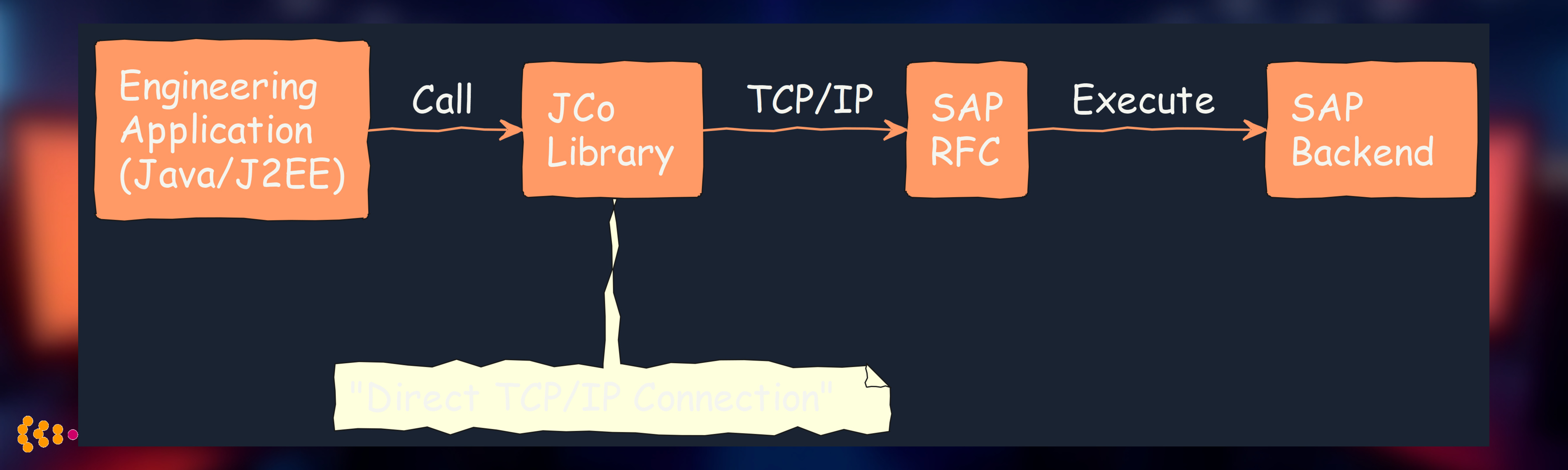
Technology: SAP JCo (Java Connector)
- Native Java library for calling SAP RFCs (BAPIs, custom function modules)
- High performance: Direct TCP/IP connection to SAP application servers
- Type-safe: Java classes generated from SAP function module interfaces
Architecture:
Code Pattern (simplified):
// Connect to SAP and call BAPI
JCoDestination destination = JCoDestinationManager.getDestination("SAP_PROD");
JCoFunction function = destination.getRepository().getFunction("BAPI_MATERIAL_SAVEDATA");
function.getImportParameterList().setValue("MATERIAL", partNumber);
function.execute(destination);
// Check return structure for errors
Use Case: Part Master Data Synchronization
When a new part is released in the PDM system, a Java service:
- Retrieves part metadata from PDM API
- Maps PDM data model to SAP material master structure
- Calls
BAPI_MATERIAL_SAVEDATAvia JCo - Handles success/failure, logs for audit trail
Benefits:
- Performance: 10x faster than EAI middleware for simple data transfers
- Developer-friendly: Java developers can work with familiar tooling
- Reduced infrastructure: No heavyweight middleware layer
Challenges:
- Connection pooling: JCo connections are expensive; proper pool management is critical
- Transaction handling: Ensuring data consistency across PDM and SAP requires careful coordination
- Error recovery: Implementing retry logic and idempotency for failed calls
Phase 3 (2012-2017): JCo Server for Inbound SAP Calls
Context: Sometimes SAP needs to call out to engineering systems (e.g., SAP requesting CAD drawings, BOM validation).
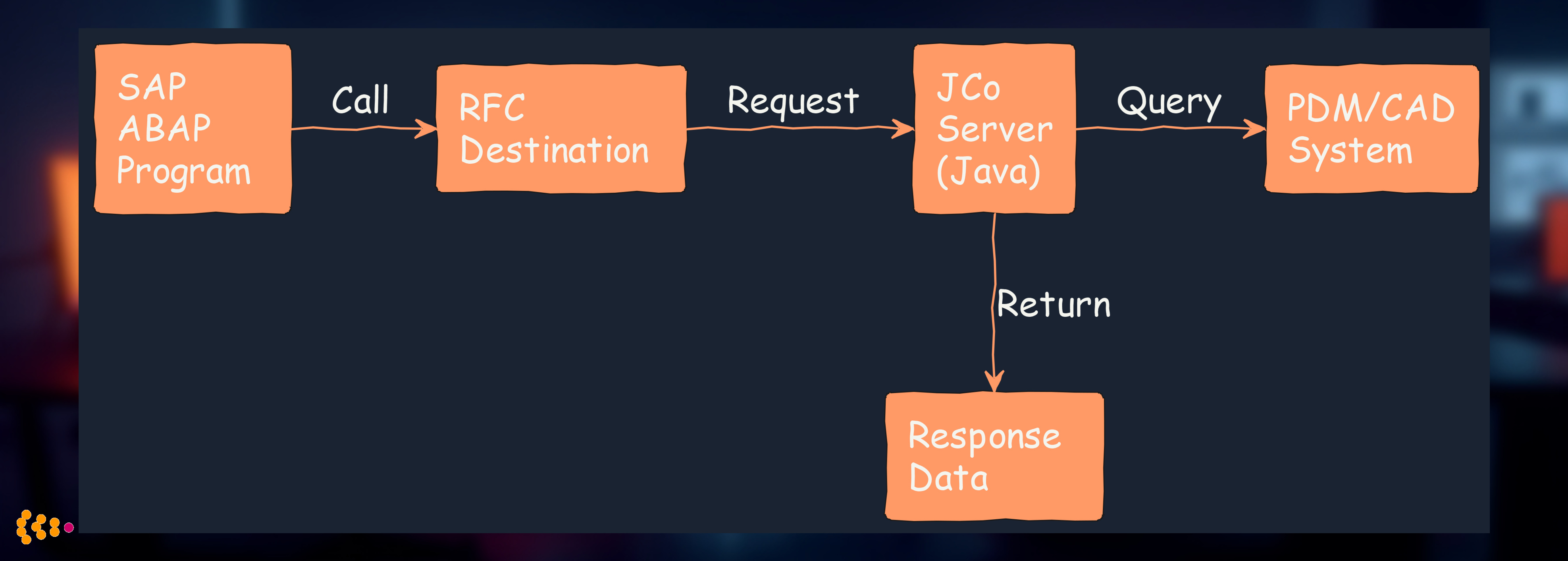
Technology: JCo Server
- Reverse JCo: Java application registers as an RFC server that SAP can call
- SAP RFC Destination: Configured in SAP to point to Java application
- Request-response pattern: SAP sends request, Java processes and returns result
Architecture:
Use Case: On-Demand BOM Retrieval
SAP production planning needs the latest engineering BOM for a new product variant:
SAP Side (ABAP) - calls remote function:
CALL FUNCTION 'Z_GET_ENGINEERING_BOM' DESTINATION 'PDM_SYSTEM'
  EXPORTING material = lv_material plant = lv_plant
  IMPORTING bom_header = ls_bom_header
  TABLES bom_items = lt_bom_items.
Java Side (JCo Server) - handles request:
public void handleRequest(JCoServerContext ctx, JCoFunction function) {
    String material = function.getImportParameterList().getString("MATERIAL");
    EngineeringBOM bom = pdmClient.getBOM(material, plant);
    // Map BOM items to SAP table structure
    JCoTable bomItems = function.getTableParameterList().getTable("BOM_ITEMS");
    // Populate rows...
}
Benefits:
- SAP-initiated workflows: SAP can request engineering data on-demand, not just receive pushes
- Real-time access: Latest engineering data available to SAP without batch synchronization
- Reduced data duplication: Some data can stay in PDM, retrieved when needed
Challenges:
- Availability: JCo Server must be highly available—SAP production planning can’t tolerate downtime
- Performance: SAP expects sub-second response times; optimize PDM queries carefully
- Security: JCo Server endpoint must be secured (SAP SNC, network firewalls)
Phase 4 (2015-2020): OData for Modern SAP Integration
Context: SAP moved toward web-based UIs (Fiori) and RESTful APIs. OData (Open Data Protocol) became SAP’s preferred integration standard.
Technology: SAP Gateway / OData Services
- RESTful: HTTP-based, JSON/XML payloads
- Standard queries: OData query syntax for filtering, sorting, pagination
- CRUD operations: Create, Read, Update, Delete exposed as HTTP verbs
- Discoverable: Metadata endpoints describe available entities and operations
Architecture:

Use Case: Engineering Portal for Procurement Data
Engineers need to see procurement status (supplier, cost, lead time) for parts directly in the engineering portal.
OData Query Example:
GET /sap/opu/odata/sap/Z_PROCUREMENT_SRV/MaterialSet('PART-12345')
  ?$expand=Supplier,PurchaseInfo&$format=json

Response: { "d": { "Material": "PART-12345", "Supplier": {...}, "PurchaseInfo": {...} } }
Portal Integration (simplified):
// Fetch part data from SAP OData service
fetch(`${sapGatewayUrl}/MaterialSet('${partNumber}')?$expand=Supplier,PurchaseInfo`)
  .then(response => response.json())
  .then(data => displayProcurementInfo(data.d));
Benefits:
- Web-friendly: Easy integration with modern JavaScript frameworks (Angular, React)
- Standardized: OData is an open standard, not SAP-proprietary
- Self-documenting: Metadata endpoints help developers discover available data
- Lightweight: No heavy client libraries—just HTTP and JSON
Challenges:
- Performance: OData queries can be slow for complex joins; sometimes custom services are needed
- Security: OAuth 2.0 / SAML for secure API access requires careful configuration
- Version management: OData service contracts must be versioned to avoid breaking clients
Phase 5 (2015-Present): MQ Series for Asynchronous Integration
Context: Some integration scenarios require guaranteed message delivery and decoupling (sender doesn’t wait for receiver).
Technology: IBM MQ (formerly WebSphere MQ)
- Message queues: Asynchronous, persistent messaging
- Guaranteed delivery: Messages stored until successfully processed
- Transaction support: Messages processed exactly once (with proper configuration)
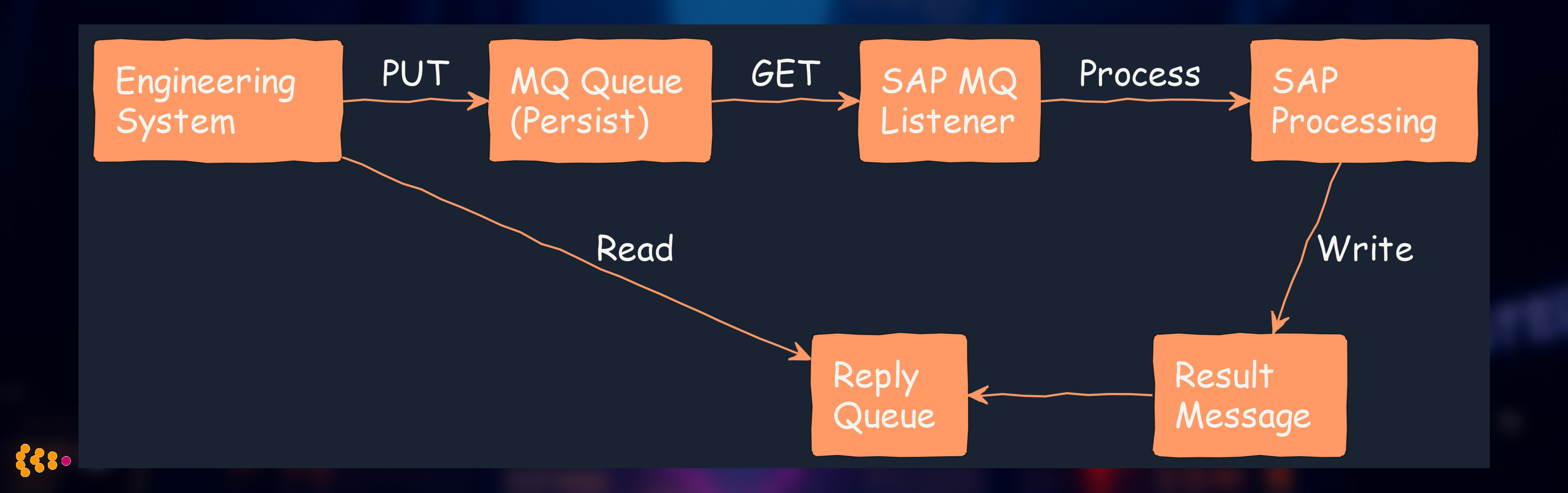
Architecture:
Use Case: Engineering Change Order (ECO) Workflow
Engineering releases an ECO affecting thousands of parts. Processing in SAP is slow (material master updates, BOM changes, work order adjustments). Synchronous processing would time out.
Solution:
- Engineering system: Publishes ECO message to MQ queue
- MQ Queue: Stores message persistently
- SAP listener: Polls queue, retrieves message when ready
- SAP processing: Updates affected records (can take minutes/hours)
- Success/failure: SAP writes result to reply queue
- Engineering system: Reads reply queue, updates ECO status
Benefits:
- Decoupling: Engineering system doesn’t block waiting for SAP
- Reliability: MQ guarantees message delivery even if SAP is temporarily down
- Scalability: Multiple SAP listeners can process messages in parallel
Challenges:
- Complexity: MQ infrastructure adds another layer to manage
- Monitoring: Need tools to track message flow, identify stuck messages
- Error handling: Dead-letter queues and retry logic essential
Integration Patterns: Best Practices from Nearly Two Decades
1. Data Mapping: The Hardest Part
Challenge: Engineering and SAP use different data models.
Example:
- Engineering: Part has “material” field (e.g., “Aluminum 6061-T6”)
- SAP: Material master has
MATERIAL_TYPE,BASE_UNIT,IND_SECTOR,MAT_GROUP, etc.
Best Practice: Create canonical data model as an intermediate layer.
Engineering Data → Canonical Model → SAP Data
  ↑                                      ↑
  Mapping Layer 1                   Mapping Layer 2
This allows changing either system without rewriting all mappings.
2. Error Handling and Idempotency
Challenge: Network failures, SAP outages, duplicate messages.
Best Practice:
- Unique message IDs: Track which messages have been processed
- Idempotent operations: Processing the same message twice has no effect
- Retry with exponential backoff: Failed messages retry after 1s, 2s, 4s, 8s, …
- Dead-letter queues: After N retries, move to error queue for manual review
3. Performance Optimization
Challenge: BOMs with 10,000+ parts, batch updates for thousands of materials.
Best Practices:
- Batch APIs: Use SAP batch RFCs (e.g.,
BAPI_MATERIAL_SAVEDATAwith multiple materials) - Parallel processing: Multi-threaded consumers for message queues
- Delta synchronization: Only transfer changed data, not full snapshots
- Caching: Cache rarely-changing SAP data (e.g., material types, units of measure) to reduce calls
4. Security
SAP systems contain sensitive business data. Security is non-negotiable.
Measures:
- Encrypted connections: SNC (Secure Network Communications) for RFC, TLS for OData
- Least privilege: Integration users have minimal necessary SAP authorizations
- Audit logging: All integration calls logged for compliance
- Secrets management: SAP credentials stored in HashiCorp Vault, not config files
5. Testing
Challenge: Testing integration without disrupting production SAP systems.
Approach:
- SAP sandbox: Dedicated SAP system for integration testing
- Mock services: For unit tests, mock SAP responses
- Contract testing: Verify integration contract (expected fields, data types) without full SAP
- Regression testing: Automated tests run on every code change
Real-World Impact
Automotive OEM CAD-PDM-SAP Integration
Scope: 50,000+ parts released annually, flowing from CAD → PDM → SAP → Manufacturing
Technologies: JCo, JCo Server, Custom Web Services
Results:
- 95% automation: Manual data entry reduced from ~30% to <5% of part releases
- 24-hour to 2-hour: Time from engineering release to manufacturing availability
- Error reduction: Data quality issues dropped 80% (automated validation vs. manual entry)
Automotive Supplier: Engineering Change Management
Scope: 500+ engineering changes per month across 20+ vehicle programs
Technologies: MQ Series, OData, Custom Portal
Results:
- Real-time visibility: Engineering and procurement see change status simultaneously
- Reduced lead time: ECO processing time cut in half (batch overnight → near real-time)
- Compliance: Full audit trail for automotive quality standards (TS 16949, VDA)
Tier 1 Supplier: Procurement Integration
Scope: Engineering portal showing real-time SAP procurement data for 100,000+ parts
Technologies: OData, SAP Gateway, Angular frontend
Results:
- User adoption: 85% of engineers use portal daily for procurement insights
- Reduced escalations: Procurement questions down 40% (self-service via portal)
- Faster decisions: Engineers select suppliers based on current cost/lead time data
The Future: SAP S/4HANA and Cloud
SAP’s platform continues to evolve:
SAP S/4HANA:
- In-memory database: HANA enables real-time analytics on transactional data
- Simplified data model: Reduced tables, cleaner structure (easier integration)
- Embedded analytics: OData services can include aggregated analytics, not just raw data
SAP Business Technology Platform (BTP):
- Cloud-native: SAP moving to cloud-first architecture
- API-first: RESTful APIs and events (SAP Event Mesh) as primary integration method
- Low-code integrations: SAP Integration Suite for visual integration workflows
Our Approach: Continue leveraging proven technologies (JCo for high-performance scenarios, OData for web/cloud) while exploring new SAP capabilities (event-driven architecture, SAP Graph for federated queries).
Conclusion
Nearly two decades of SAP integration in automotive has taught us:
-
Technology is a means, not the end: Choose the right tool (EAI, JCo, OData, MQ) based on the specific use case—performance, complexity, and maintainability.
-
Data mapping is the hard problem: Invest in canonical data models and robust mapping layers. Technology changes; data model mismatches persist.
-
Resilience matters: Automotive production can’t stop. Build integrations with retry logic, error handling, and monitoring from day one.
-
Collaboration is key: Successful integration requires SAP ABAP developers, Java engineers, PDM administrators, and business stakeholders working together.
-
Evolution, not revolution: SAP systems evolve slowly. Plan for coexistence of old (RFC) and new (OData) integration methods.
For nearly two decades, we’ve integrated custom automotive software with SAP across dozens of projects—from small supplier portals to enterprise-wide PLM-ERP synchronization. The technologies change, but the core challenge remains: making engineering and business systems work as one.
Technologies Used: SAP ECC, SAP S/4HANA, SAP XI/PI, SAP Gateway, SAP JCo, OData, IBM MQ (WebSphere MQ), RFC, BAPI, IDoc, Java/J2EE, Spring Boot
Industries: Automotive (OEMs and Tier 1/2/3 suppliers), Industrial Manufacturing
About: HSEC has been architecting SAP integrations since 2007, with deep expertise in automotive engineering and manufacturing domains.
Contact: Need SAP integration expertise for your engineering systems? Let’s talk.